





AI Call Recap.
AI Call Recap turns each recorded call into a transcript, a summary, a read on the tone and a breakdown of the topics discussed, within minutes of the call ending. Nobody takes notes during the call or replays it afterwards, and managers have an accurate record for follow-ups, coaching and disputes.
Get in touchWhat You Get After Every Call.
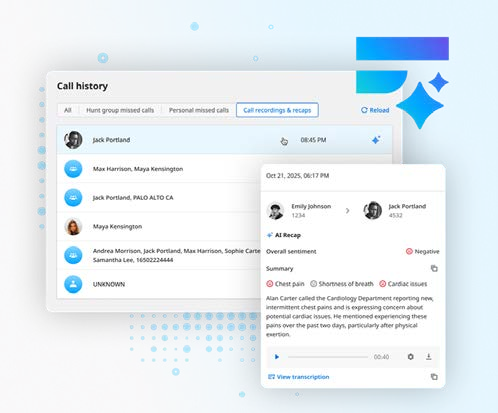
Within minutes of a recorded call ending, the recap appears in the Elevate desktop and mobile apps and in the Archiving portal.
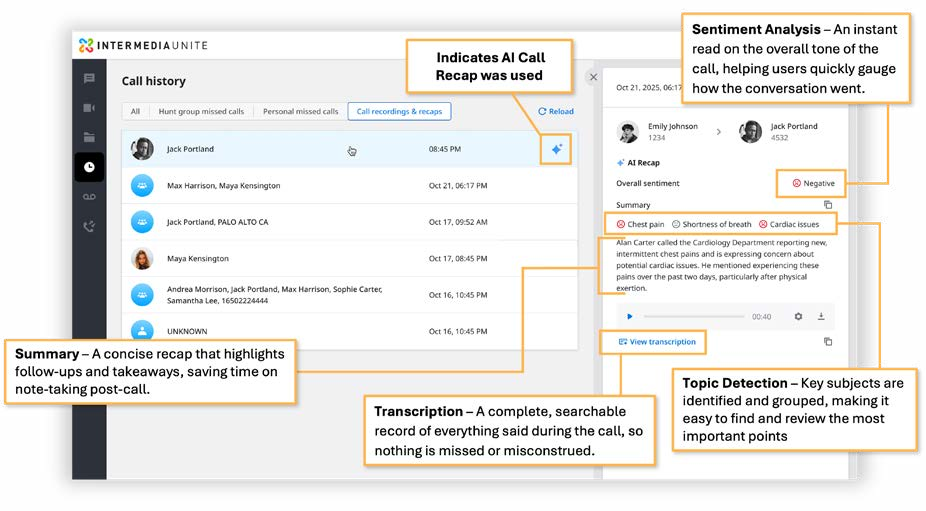
- Transcription. A complete, searchable record of everything said.
- Summary. A concise recap of the call's main points, so follow-ups and takeaways are read in seconds.
- Sentiment. An instant read on the overall tone of the call.
- Topics. The key subjects raised, grouped, with sentiment applied to each.
With AI Call Recap, Your Business Can.
- Move on to the next call or task instead of writing up post-call notes.
- Give the caller full attention rather than typing notes during the call.
- Rely on an accurate account of every conversation, which makes disputes and follow-ups easier.
- Find stored recaps quickly, for visibility into what was said and agreed.
Where It Makes a Difference.
- Customer support teams. Agents focus on the conversation, not the notes. When the call ends there is an accurate account of it, and they move straight on to the next one.
- Sales calls. Reps ask detailed questions without worrying about their notes, then use the recap and transcript to prepare an accurate quote quickly.
- Complaints and disputes. A manager searches Archiving for the recap of the call and settles the matter knowing the account is accurate.
What You Need.
AI Call Recap is included at no extra cost on Essentials and Pro, and on the Elevate for Teams equivalents. A few things need to be in place, all of which we set up for you.
- Call recording enabled at the account level, either automatically for a hunt group or a user, or on demand by pressing the record button in the app or dialling #9.
- Archiving enabled, with the 30-day retention included on every licence or a longer retention plan.
- AI Call Recap switched on for each user or hunt group that needs it.
- Language. The recap is produced in the language of the call, with UK English among the languages supported.
AI Meeting Recap does the same for video meetings, marking out decisions, next steps and discussion topics, and is included on the same licences. Pushing recaps into a CRM is not yet available; Intermedia say it is a future update.
ArchivingLet’s Talk.
If your team spends too long writing up calls, or you need a reliable record of what was agreed, we will talk you through switching on AI Call Recap with your Elevate phone system.
Get in Touch.